Merge, Split & Organize PDFs
Put every PDF page in the right place.
Merge, split, reorder, rotate, or extract PDF pages privately in your browser.
PDF workspace
No PDFs added yet.
Choose PDF files
Up to 20 PDFs · 100 MB each · 250 MB total · 500 pages

A tidy document without the upload queue
Arrange the pages you need, then check the result.
MallowDesk keeps common PDF jobs in one workspace and explains when a document needs a safer tool before it can be edited.
Which PDFs work here?
Most page-based PDFs work directly. Document extras that cannot be preserved are listed before download, while visible interactive content may need a static copy.
Keep the original and use your local viewer’s Print or Export to PDF option when a trusted document needs a simpler copy. Read the compatibility guide.
Worked example
Choose the result, not just the tool name
You have a three-page report and a two-page appendix.
- To keep all five pages together, add the report first and the appendix second, then create one PDF.
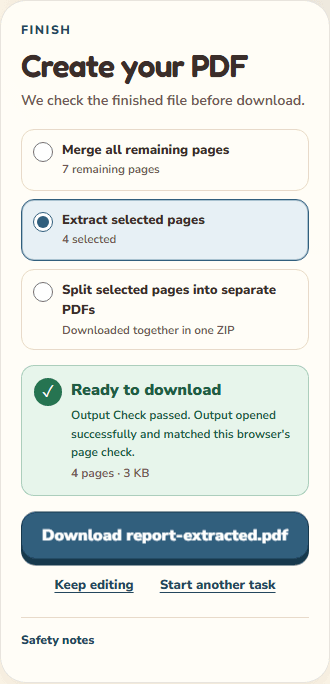
- To keep only report pages 2 and 3 together, open Extract and select those pages.
- To make one file per report page, open Split, select the pages, and create a ZIP.
Result: Merge: one five-page PDF. Extract: one two-page PDF. Split: separate one-page PDFs inside a ZIP.
Before you finish: Choose a task before adding files. Keep your originals: closing or reloading this tab clears the workspace. These tools do not compress PDFs, perform OCR, or edit text.
Merge and organize in one page grid
Add several PDFs, move their pages into one clear order, rotate sideways scans, or remove a page without rebuilding the batch.
Extract or split only what you select
Select cards directly or enter a range such as 1-3, 6, 9-12. Save the selection as one PDF or as separately named page files in a ZIP.
The document stays in this tab
PDF bytes, filenames, thumbnails, page checks, and output files are not sent to an application server or stored as a work history.
The result is reopened before download
Output Check compares page count, dimensions, rotation, order, and a small visual fingerprint before the Download button appears.