Extract PDF Pages
Extract the PDF pages you actually need.
Select the pages you need and create one smaller checked PDF.
PDF workspace
No PDFs added yet.
Choose PDF files
Up to 20 PDFs · 100 MB each · 250 MB total · 500 pages

A smaller PDF from a visible selection
Keep selected pages together in one new PDF.
Extraction uses the current visible order, so you can select, rearrange, and rotate the pages before creating the smaller document.
Which PDFs work here?
Most page-based PDFs work directly. Document extras that cannot be preserved are listed before download, while visible interactive content may need a static copy.
Keep the original and use your local viewer’s Print or Export to PDF option when a trusted document needs a simpler copy. Read the compatibility guide.
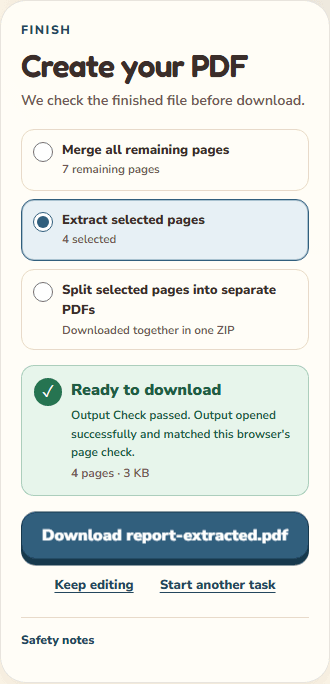
Worked example
Keep four pages together without the full report
report.pdf has seven pages. You only need pages 2, 3, 4, and 7.
- Add the report. Before rearranging it, enter 2-4, 7 in the page range and apply the selection.
- Confirm that four pages are selected and Extract selected pages is the output choice.
- Choose Create PDF, wait for the result check, and download report-extracted.pdf.
Result: One four-page PDF in source order 2 → 3 → 4 → 7. Your original seven-page report is unchanged.
Before you finish: The range uses current remaining positions, not printed page labels such as i, ii, or 10. After moving or removing pages, read each card's source page label before applying a new range. Fewer pages does not guarantee a proportionally smaller file.
Use range selection for long documents
Enter a range such as 1-3, 6, 9-12, or select cards directly when only a few pages are needed.
Reorder the extracted pages
The new PDF follows the selected pages in their current workspace order, not necessarily their original source order.
Extraction is not redaction
The tool reorganizes visible pages. It does not promise forensic removal of unused shared PDF resources or confidential content.